How to Choose a Home Security Camera System
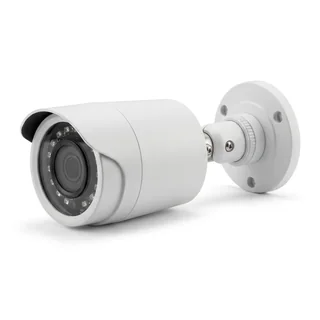
A camera system is only as good as the moment you need it: a face at the gate, a plate number in the street, a delivery left at the door at 2 a.m. Before comparing brands, it helps to answer a few questions about the building, the cabling and what you want each camera to see.
Start with what each camera must see
Walk around the property and list every spot that matters: the main gate, the garage, the back door, the stairwell, the shop till. For each one, decide what you need from the footage:
- Overview: what happened and when. A wide lens covering a garden or a parking area.
- Recognition: who it was. The camera must be close enough, or zoomed enough, to show a face clearly.
- Detail: a plate number or the cash in a drawer. This needs a narrower lens or a higher resolution, aimed at a small area.
One wide camera rarely does all three. Most homes end up with a mix: a wide view of the yard and a tighter camera on the entrance at face height.
DVR with HDCVI cameras, or NVR with IP cameras
This is the first real technical choice, and it depends mostly on the cable you have or can run.
HDCVI cameras and a DVR
HDCVI is Dahua's analog high-definition technology. The cameras send video over coaxial cable to a DVR (Dahua also calls its hybrid recorders XVR), which encodes and records it. The advantages:
- It reuses existing coaxial cable from an older analog system, which saves rewiring a finished building.
- Coax carries the signal over longer distances than Ethernet. Dahua publishes the supported distance for each resolution, and PoC (power over coax) models can carry power on the same cable.
- Cameras and recorders are usually cheaper for the same channel count.
The limits: resolutions and smart features are generally behind IP cameras, and each camera needs its own cable run back to the recorder.
IP cameras and an NVR
IP cameras encode the video themselves and send it over a network cable. With PoE (Power over Ethernet), one Cat6 cable carries both data and power, from a PoE switch or from the PoE ports on the NVR. The advantages:
- Higher resolutions and better analytics such as person and vehicle detection, line crossing and face detection on supported models.
- Flexible wiring: cameras can connect to any switch on the network, not only to the recorder.
- One cable per camera for power and video when you use PoE.
The limit to remember: a standard Ethernet run is 100 m from the switch to the camera. Longer runs need an extra switch, an extender or fiber.
Rule of thumb: for a new villa, a new shop or any rewiring job, choose IP. For a building that already has good coax to every camera point, HDCVI is a sensible, lower-cost upgrade.
Resolution: 2MP, 4MP or 4K
| Resolution | Pixels | Good for |
|---|---|---|
| 2MP (1080p) | 1920 x 1080 | Indoor rooms, short corridors, general overview |
| 4MP | 2560 x 1440 | Entrances, gardens, shop floors; the common middle ground |
| 8MP (4K) | 3840 x 2160 | Wide areas where you need to zoom into recordings later |
More pixels give more detail, but they also mean higher bitrate, more hard-disk space and more upload bandwidth when you watch remotely. A 4K camera with a poor lens choice can still miss a face that a well-placed 4MP camera captures. Choose the resolution after you know the distance and the field of view.
Lens matters as much as resolution
Focal length decides how wide or narrow the view is. A 2.8 mm lens gives a wide view for rooms and yards. A 6 mm lens or longer gives a narrower view that shows more detail at a distance, which suits a gate or a driveway.
Night vision
Most incidents happen at night, so read this part of the datasheet carefully.
- Infrared (IR): the camera switches to black-and-white and lights the scene with invisible IR. The datasheet gives an IR distance; treat it as the best case.
- Full-color night: a sensitive sensor plus a warm white light keeps the image in color, which helps identify clothes and car colors. The visible light also acts as a deterrent.
- Dual or smart illumination: the camera stays in IR and turns on the white light only when it detects a person or vehicle.
Avoid aiming a camera straight at a street lamp or a glass door that reflects IR back into the lens. For entrances with bright daylight behind the subject, look for WDR (wide dynamic range) so faces are not dark silhouettes.
Indoor or outdoor
- Outdoor cameras need a weather rating such as IP66 or IP67 against dust and water. Our summers are hot, so check the operating temperature range too.
- Dome cameras within reach of a hand or a stick benefit from an IK10 vandal rating.
- Indoor Wi-Fi cameras, such as Imou models, are the quickest option for watching children, elderly parents or a pet. They record to a microSD card or the cloud and need a good Wi-Fi signal where they sit.
Think about privacy as well. Point cameras at your own property, not into a neighbor's window, and decide who in the family gets access to the app.
Recording and remote viewing
Plan the hard disk with the cameras. Resolution, compression (H.265 needs far less space than H.264 for similar quality) and motion versus continuous recording all change how many days you keep.
For remote viewing, the recorder connects to your router and the brand's app (DMSS for Dahua, Imou Life for Imou) shows live and recorded video. Change the default password on day one and keep the recorder's firmware up to date.
A quick checklist
- List each camera spot and whether you need overview, recognition or detail.
- Check existing cable: good coax points to HDCVI; new cabling points to IP with PoE.
- Pick resolution and lens per spot, not one model for everything.
- Confirm night vision type, weather rating and WDR for entrances.
- Size the hard disk for the number of days you want to keep.
- Put the recorder, router and PoE switch on a UPS so recording continues during power cuts.
Where to start
- Building new or rewiring: browse IP cameras and kits and PoE switches.
- Reusing coax: see HDCVI (HD) solutions.
- Recorders and disks: NVR and DVR recorders and surveillance hard drives.
- One or two rooms only: Wi-Fi cameras.
- Not sure about angles and cable runs? Book an installation visit or contact us.