Smart Lock Buying Guide: Fingerprint, PIN, Card, App or Face?
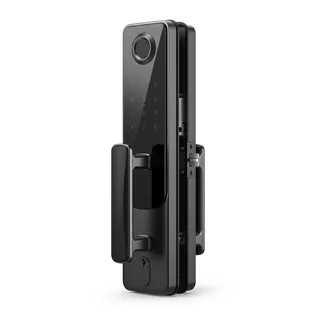
A smart lock removes the daily hunt for keys and lets you decide exactly who can open the door and when. It also replaces one of the most important pieces of hardware in your home, so it is worth choosing carefully. This guide covers the unlock methods, the door questions that catch people out, power, and installation.
Unlock methods compared
Most smart locks combine several methods. Think about who uses the door every day: children, older parents, a housekeeper, a driver, guests.
Fingerprint
The most popular method for families. Nothing to carry, nothing to forget. Each person registers one or more fingers, and you can delete a user at any time. Register two fingers per person, including one on the other hand, in case of a cut or a bandage. Fingerprints of young children and some older adults can be harder to read, so keep a second method for them.
PIN code
Useful for visitors and staff. Look for an anti-peep or virtual code feature, which lets you type extra random digits before or after the real code so that someone watching cannot copy it. Many locks also support temporary or time-limited codes, which suit cleaners, maintenance visits or guests.
Card or key tag
An RFID card or key tag is simple for children and older relatives who struggle with fingerprints or codes. If a card is lost, delete it from the lock.
App and remote unlock
Through Bluetooth, the app works when you are near the door. For remote unlocking, notifications and access logs while you are away, the lock needs Wi-Fi, either built in or through a separate gateway or bridge. Check which one your model uses before you buy.
Face recognition
Premium models unlock as you approach, which is handy when your hands are full. Face recognition adds cost and uses more power, and performance varies by model and lighting, so read the manufacturer's specifications carefully.
Mechanical key
Almost every smart lock keeps a mechanical key as a backup. Store it somewhere you can reach from outside the house, such as with a trusted relative or in the car, not on the kitchen counter.
Check your door before you buy
Door compatibility is where most problems happen. Measure and photograph your door before choosing.
- Door material: wooden doors, steel or armored doors, aluminum frames and glass doors each need different lock bodies or kits. Armored doors are common in apartments and often need a model designed for them.
- Door thickness: every lock lists a supported thickness range in its specifications. Measure yours.
- Lock body (mortise): the existing cut-out in the door must match the new lock body, or be modified by the installer. Note the backset, the distance from the door edge to the center of the handle.
- Handing: whether the door opens left or right, inward or outward. Many locks are reversible, but confirm.
- Outdoor exposure: a gate or a door facing direct sun and rain needs a model rated for outdoor use. Direct afternoon sun on a screen or fingerprint sensor is hard on any electronics.
- Frame condition: the strike plate and frame must align properly. A smart lock on a sagging door will struggle and drain its batteries faster.
Power and batteries
Smart locks run on batteries, so plan for that:
- Battery type: some models use standard AA batteries, others use a rechargeable lithium pack. Rechargeable packs save buying batteries but need charging; AA cells can be replaced in a minute. Philips EasyKey models, for example, include both types across the range, so check the exact model.
- Battery life depends on how many times a day the door opens, Wi-Fi use and features such as face recognition. Use the manufacturer's estimate as a guide, not a promise.
- Low-battery warning: the lock beeps or shows an alert, and app-connected models send a notification. Replace or charge promptly.
- Emergency power: most locks have an external port, often USB, where you can connect a power bank to wake the lock if the batteries are completely dead. Find it on your model on day one.
Security and privacy points
- Review the user list regularly and delete people who no longer need access, such as former staff.
- Use the access log, if your model has one, to see who opened the door and when.
- Enable auto-lock so the door locks itself after closing.
- Protect the app account with a strong password, and set up admin access for a second family member.
- A smart lock is only as strong as the door and frame. On a weak door, upgrade the door first.
Installation
Some smart locks are designed to replace a standard lock with simple tools. Many others, especially on armored doors and with mortise bodies, need cutting or drilling and careful alignment. A poorly fitted lock jams, wears the motor and drains the batteries. If your door needs any modification, have it installed by someone who has fitted that model before.
After installation, test every method from both sides: fingerprint, code, card, app, mechanical key, and the inside handle. Test the emergency power port too.
Quick decision guide
| Situation | Good fit |
|---|---|
| Family apartment | Fingerprint plus PIN, auto-lock, app notifications |
| Housekeeper or driver visits | Temporary or scheduled PIN codes, access log |
| Older relatives or children | Add RFID cards as a simple backup method |
| Villa gate exposed to weather | Outdoor-rated model, or an access control reader with an electric lock |
| Rental or short-stay unit | Wi-Fi or gateway model for remote code management |
Where to start
- Browse smart locks, including Philips models.
- Need a gateway, cards or a lock body? See smart lock accessories.
- For gates and offices, compare with access control and locks and exit buttons.
- Not sure your door is compatible? Send us photos through contact or book an installation visit.